







A push button switch pinout tells you what each terminal on the back of the button actually does. On a 22 mm industrial button there are no numbered “pins” in the electronics sense. There are screw terminals on one or more contact blocks, and the number printed next to each screw is a code, not an address. Read it correctly and you know which pair is closed at rest, which pair closes when pressed, and which pair belongs to the second, third or fourth block stacked behind the same head.
The confusion behind most push button switch pinout questions comes from three numbering systems sitting on top of each other: the block code moulded into the plastic (10, 01, 11, 22), the IEC terminal numbers printed beside the screws (11/12, 13/14, 21/22), and the symbol on the wiring diagram. They describe the same part from three different angles, and mixing them up is the most common reason a panel is wired backwards.
Push Button Switch Pinout in Three Numbers
Before touching a screwdriver, identify which of the three numbers you are looking at.
| What you are reading | Example | Lo que te dice | Where it appears |
|---|---|---|---|
| Block code | 11 | How many contacts: one normally open plus one normally closed | Moulded into the block, printed in the catalogue and on the box |
| Terminal number | 13/14 | Which single pair you are holding: contact 1, make function | Printed or moulded next to each screw |
| Diagram symbol | —| |— | The function as drawn: open or closed at rest | Schematic, nameplate, catalogue drawing |
The block code is a quantity. It says a block carries one normally open contact (10), one normally closed contact (01), one of each (11), two of each (22), three of each (33) or four of each (44). It says nothing about which terminal is which. That is the terminal number’s job.
This split matters in practice. A maintenance fitter holding a block marked 11 knows it has two contacts but not which screw is which. A fitter reading 13/14 and 21/22 knows both contacts and their function without opening the panel door. If you are still deciding which block type suits a task, the Comparación entre interruptores de botón NO y NC covers the functional difference before you get to the numbering.
What the IEC Terminal Numbers Tell You
Industrial control devices follow a two-digit terminal marking system defined in IEC 60947-5-1 and the older EN 50005. Each terminal carries two digits, and the two digits mean different things.
The tens digit is the contact number. The units digit is the function.
| Units digit | Función | Pair example (contact 1) |
|---|---|---|
| 1 and 2 | Normally closed (NC), break contact | 11 and 12 |
| 3 and 4 | Normally open (NO), make contact | 13 and 14 |
| 5 and 6 | Early-make or late-break contact, special timing | 15 and 16 |
| 7 and 8 | Special purpose, defined by the manufacturer | 17 and 18 |
So 11/12 is the normally closed pair of contact 1. 13/14 is the normally open pair of the same contact. 21/22 and 23/24 are the normally closed and normally open pairs of contact 2, and so on through 31/32, 33/34, 41/42, 43/44.
The rule generalises because it is positional, not arbitrary. Odd units digits sit on one side of a contact, even units digits on the other. That is why 21/22 is universally a break contact and 13/14 is universally a make contact across IEC-pattern devices, whether the block is a push button, a limit switch, a contactor auxiliary or a motor protection circuit breaker.
Two consequences are worth memorising:
- 43/44 is not the forty-third terminal. It is the make contact of contact 4. Counting screws instead of reading pairs is how panels end up with a stop button wired into a start circuit.
- 11/12 and 21/22 are both normally closed but they are different contacts. Electrically identical, mechanically separate. On a two-channel emergency stop, one block supplies 11/12 and the second supplies 21/22, and both must open independently for the monitoring circuit to prove redundancy.
Push Button Switch Pinout by Contact Block
Once the terminal rule is clear, the block code translates directly. The table below maps the common block codes to the terminal pairs a fitter will find when the block is opened.
| Block code | Contacts | Terminal pairs | Terminals to land | Typical job |
|---|---|---|---|---|
| 10 | 1 NO | 13/14 | 2 | Iniciar, trotar, reiniciar |
| 01 | 1 NC | 11/12 | 2 | Stop, emergency stop, interlock loop |
| 11 | 1 NO + 1 NC | 13/14 and 21/22 | 4 | Combined start and stop on one head |
| 20 | 2 NO | 13/14 and 23/24 | 4 | Two-position selector, dual-head button |
| 02 | 2 NC | 11/12 and 21/22 | 4 | Two-channel stop, one head |
| 22 | 2 NO + 2 NC | 13/14, 23/24, 11/12, 21/22 | 6 | Changeover selector, mode selection |
| 33 | 3 NO + 3 NC | to 33/34 and 31/32 | 6 | Multi-step machine mode |
| 44 | 4 NO + 4 NC | to 43/44 and 41/42 | 8 | Changeover with full feedback |
Blocks stack. A single 22 mm operator will carry two, three or four blocks on the same collar, and each block keeps its own contact numbers. The numbering does not restart at each block level, so a 22 block on one head occupies contacts 1 and 2 and presents six terminals rather than four separate pairs scattered around the body.
That stacking is where most pinout mistakes happen in the field. Two blocks that look identical from the front can carry different codes, and the only way to tell them apart is to read the code moulded into the side or count which pairs are closed at rest. If you need to change a contact arrangement after the panel is built, the guide to push button switch types and operation explains which operators accept a different block without changing the head.
Illuminated and 5-Pin Push Button Pinouts
Illumination is where consumer and industrial push buttons genuinely diverge, and where a pinout copied from a hobby site will fail.
On a small 5-pin push button the five terminals are usually common, normally open, normally closed, LED positive and LED negative. All five are pins on the same body, wired directly.
On a 22 mm industrial illuminated button there is no fifth pin. The operator takes a separate lamp or LED element, supplied as its own module with two terminals marked for supply, and that module sits behind the contact block on the same head. An illuminated button with an 11 block therefore has four switch terminals plus two lamp terminals, and the lamp terminals are physically separate from the contact numbering scheme. Wiring the lamp supply from the same pair as the contact is a reliable way to blow the LED element on the first press.
The lamp element also carries its own voltage rating, usually marked on the module rather than on the operator. A 24 V element in a 230 V circuit fails immediately; a 230 V element on a 24 V supply simply does not light and is easily misdiagnosed as a dead contact. Check the element marking before assuming the pinout is wrong.
Because block codes, terminal numbering and lamp modules vary between manufacturers, the catalogue drawing and the nameplate on the actual device remain the authority. If a pinout from a forum contradicts the marking on the block in your hand, the block wins.
How to Identify Terminals With a Multimeter
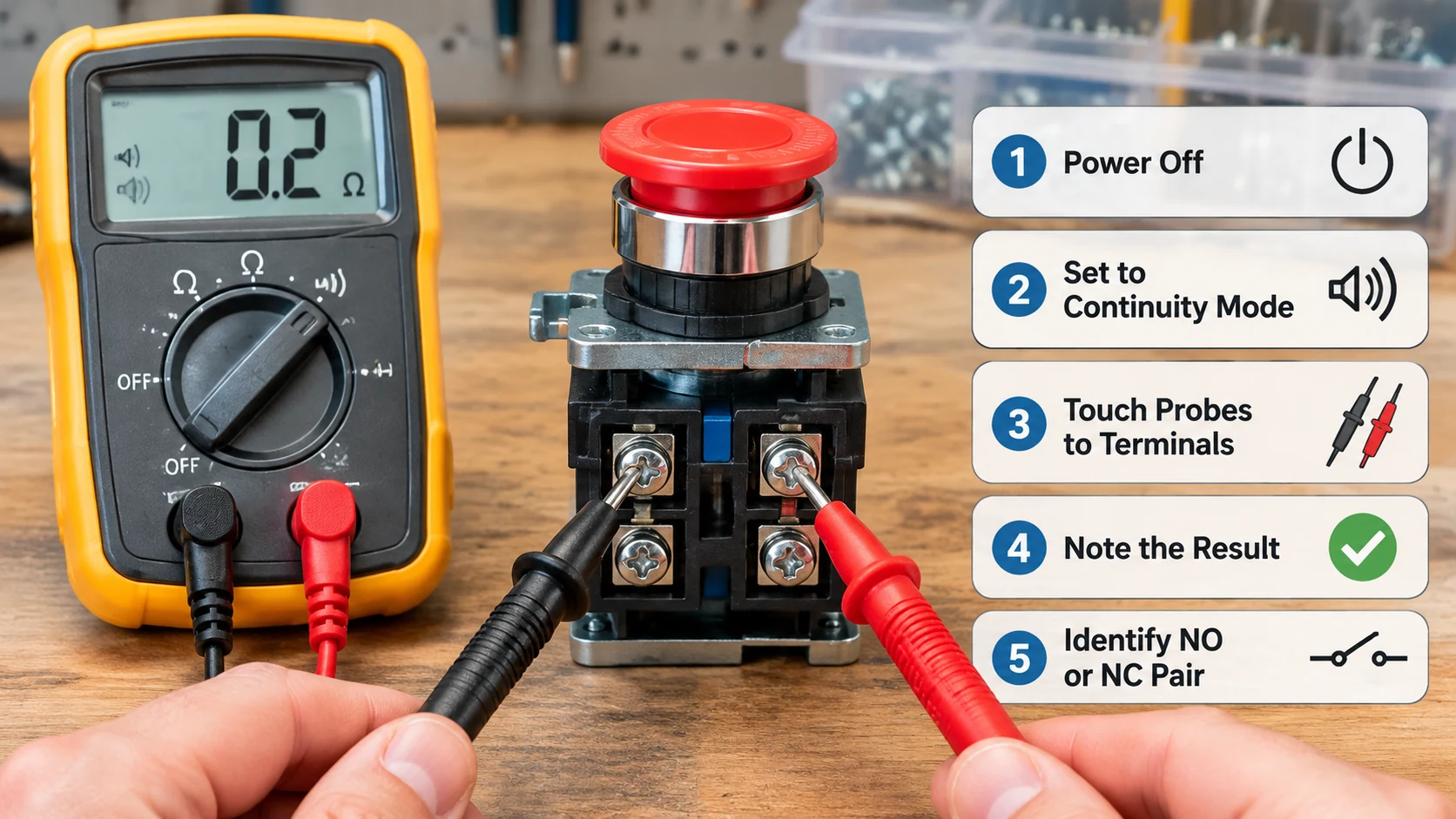
When the marking is worn, painted over or simply missing, continuity testing settles the pinout in under a minute. This is a dead-circuit test; never perform it on a live panel.
- Isolate and prove dead. Open the upstream protective device, lock it off, and verify no voltage is present at the terminals with a tester known to be working. Treat the control circuit as live until you have proved otherwise.
- Set the meter to continuity or resistance. A continuity beep is faster than reading ohms, and for contacts either is sufficient.
- Test in the released state. The pair that reads closed is normally closed: on a correctly marked block that is 11/12, 21/22 and so on. The pair that reads open is normally open: 13/14, 23/24.
- Press and hold the head, then repeat. The readings invert. The pair that was closed now reads open and the pair that was open now reads closed. If a pair does not change state, it is either a different contact number or a failed block.
- Repeat per block on stacked assemblies. Test every pair individually rather than assuming the blocks are ordered top to bottom. Stack order varies with the operator and the mounting collar.
For an illuminated button, test the lamp terminals separately with the element removed. A continuity reading across them in one direction and open in the other indicates a diode-based LED element, which is normal. A reading in both directions on an element marked as an LED suggests a failed element or a wrong replacement.
Common Push Button Switch Pinout Mistakes
Most of these are caught on the bench in seconds and missed in the field for weeks.
- Reading the block code as a terminal number. A block marked 11 does not have a terminal 11 in the sense of a single screw. It has 13/14 and 21/22.
- Assuming contact 1 is the top block. Contact numbers follow the block designation, not the physical stack order. Verify by test, not by eye.
- Wiring a two-channel stop from one block. Both channels must come from separate contacts, typically 11/12 and 21/22, so the monitoring circuit can detect a welded contact.
- Feeding the lamp from the contact pair. Industrial lamp elements need their own supply terminals; sharing the contact pair puts the full load current through the element.
- Trusting a 5-pin pinout on a 22 mm button. The pin layouts published for small PCB-mount buttons do not transfer to panel-mount industrial operators.
The same discipline applies when a block is replaced rather than wired fresh. Photograph the pinout before removal, then record the terminal pairs. A photograph of the block with its markings legible is faster than re-deriving the pinout from a drawing that may be two revisions old.
PREGUNTAS FRECUENTES
Is a 4-pin push button the same as an 11 block?
Not the same thing. A 4-pin push button is a small PCB or panel device with four physical pins, usually one contact plus an LED. An 11 block is an industrial contact block carrying one normally open and one normally closed contact, which presents four switch terminals but no lamp terminals. The count matches; the function does not.
What do 13 and 14 mean on a push button?
They are the normally open pair of contact 1 under IEC 60947-5-1. The units digits 3 and 4 mark a make contact; the tens digit 1 marks the first contact. Closed only while the head is pressed.
Do all push button switches use the same pinout?
No. IEC-pattern industrial devices share the two-digit rule, but the physical position of the screws, the block codes and the lamp terminals vary between manufacturers and product families. Always confirm against the marking on the device and the manufacturer’s drawing.
How can I tell if my push button is NO or NC without a meter?
Read the terminal marking: units digit 1 or 2 is normally closed, 3 or 4 is normally open. If the marking is unreadable, the mechanical feel is a weak indicator at best and the meter test in the section above is the reliable method.
Can I change the pinout after the panel is built?
The contact block can usually be changed without removing the operator, so a 10 block can become an 11 or a 22 on the same head. The terminal numbers change with the block, so re-label the wires at the same time. This is a bench job, not a live one.
Getting the Pinout Right Before the Panel Is Built
A push button switch pinout is not a mystery once the two-digit rule is understood: tens digit for the contact, units digit for the function, 1 and 2 for break, 3 and 4 for make. What fails in practice is the handover between the catalogue code, the marking on the block and the drawing on the panel schedule. Confirm all three against the device before the wires go in, and the wiring itself becomes routine.
If the contact arrangement for a particular panel is still open, the Guía de cableado para interruptores de botón walks through each configuration terminal by terminal, from a two-terminal device up to the five-terminal illuminated version.
Cantak builds the LA38, XB2 and GQ push button ranges with contact blocks from 10 through 44, plus matching AD169 signal lamps on the same 22 mm panel hole. If you are confirming terminal layouts for a panel schedule or want the block and lamp element specified together on one list, our engineers can check the arrangement against your drawing. The push button switch and signal lamp range lists the operators, block codes and lamp voltages, the full range sits alongside the rotary switch and isolator series on the same 22 mm panel standard, and you can send a panel layout through the inquiry form for a model list back.